

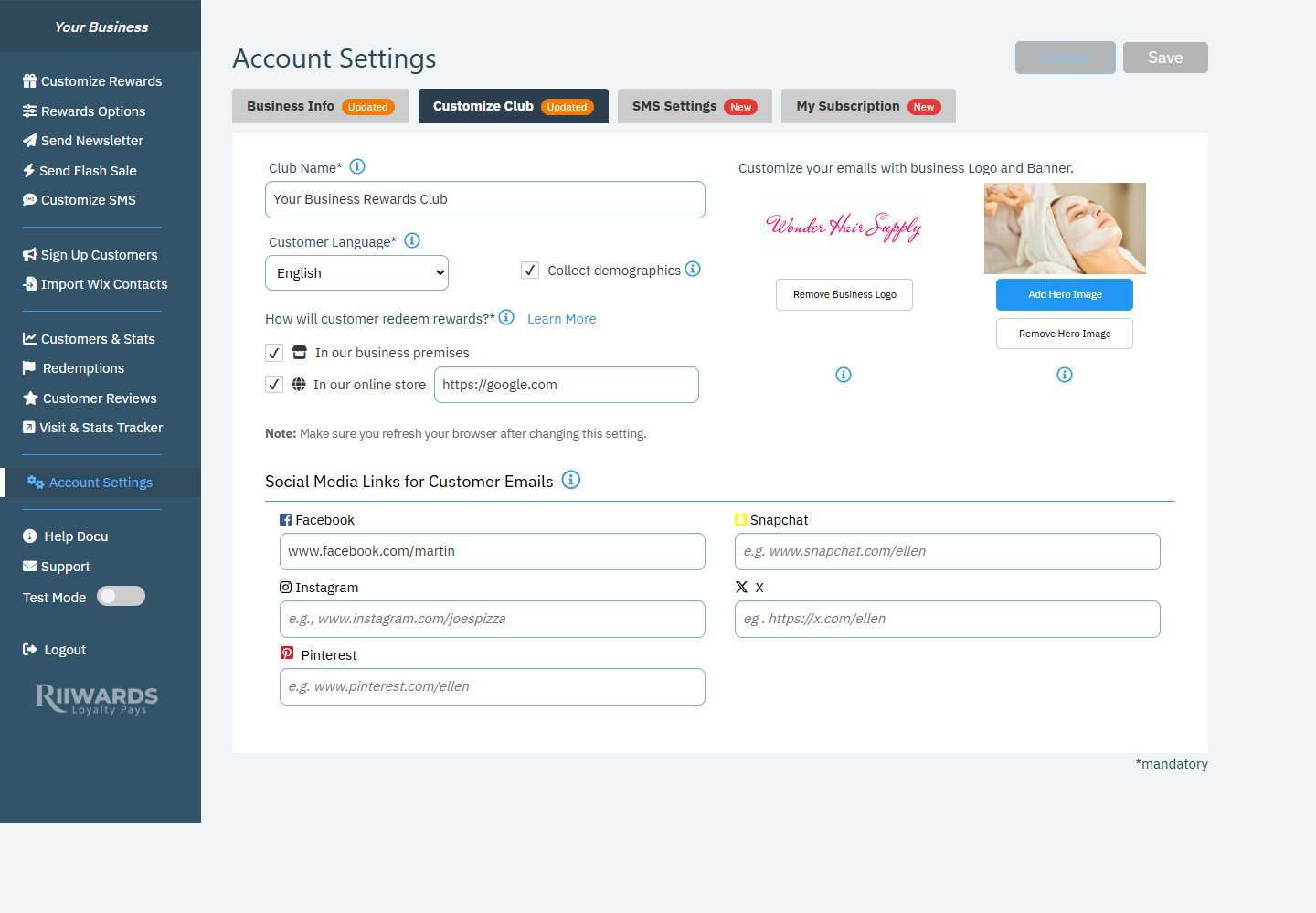
Account Settings, Customize Club tab
Club name
Club Name is the name customers see on the signup form and in emails, for example “Joe’s Pizza Rewards Club”. Up to 60 characters.Customer language
Customer Language sets the language your customers see in emails, the signup form and the widget. Choose English, Spanish, French, Portuguese, German, Italian or Dutch. Your dashboard stays in English.Collect demographics
Check Collect demographics to add an optional question to your signup form that asks customers for their age group and gender. Customers can skip it. The answers feed the Graphs in Customers & Stats.How customers redeem rewards
Under How will customer redeem rewards?, choose where customers can use their rewards:- In our business premises: customers show the reward email in your store.
- In our online store: customers use a promo code in your online shop. Enter your online store URL.
Refresh your browser after you change this setting. Features built for in-person visits, such as check-in rewards, one-time use and the Visit & Stats Tracker, are only available when In our business premises is selected.
Logo and hero image
Under Customize your emails with business Logo and Banner:- Add Business Logo / Remove Business Logo: your logo appears in the email signature of the emails customers receive.
- Add Hero Image / Remove Hero Image: the hero image is used as the default header image for your newsletters.
Social media links
Under Social Media Links for Customer Emails, add links to your Facebook, Snapchat, Instagram, X and Pinterest pages. They appear with your logo in the signature of customer emails. Leave a field empty to hide that network.Related
How redemption works
In-store and online redemption explained.
Edit reward emails
Change the text and images of each email.
Customer signup experience
What customers see when they join.
Business info
Business name, contact emails and phone.