

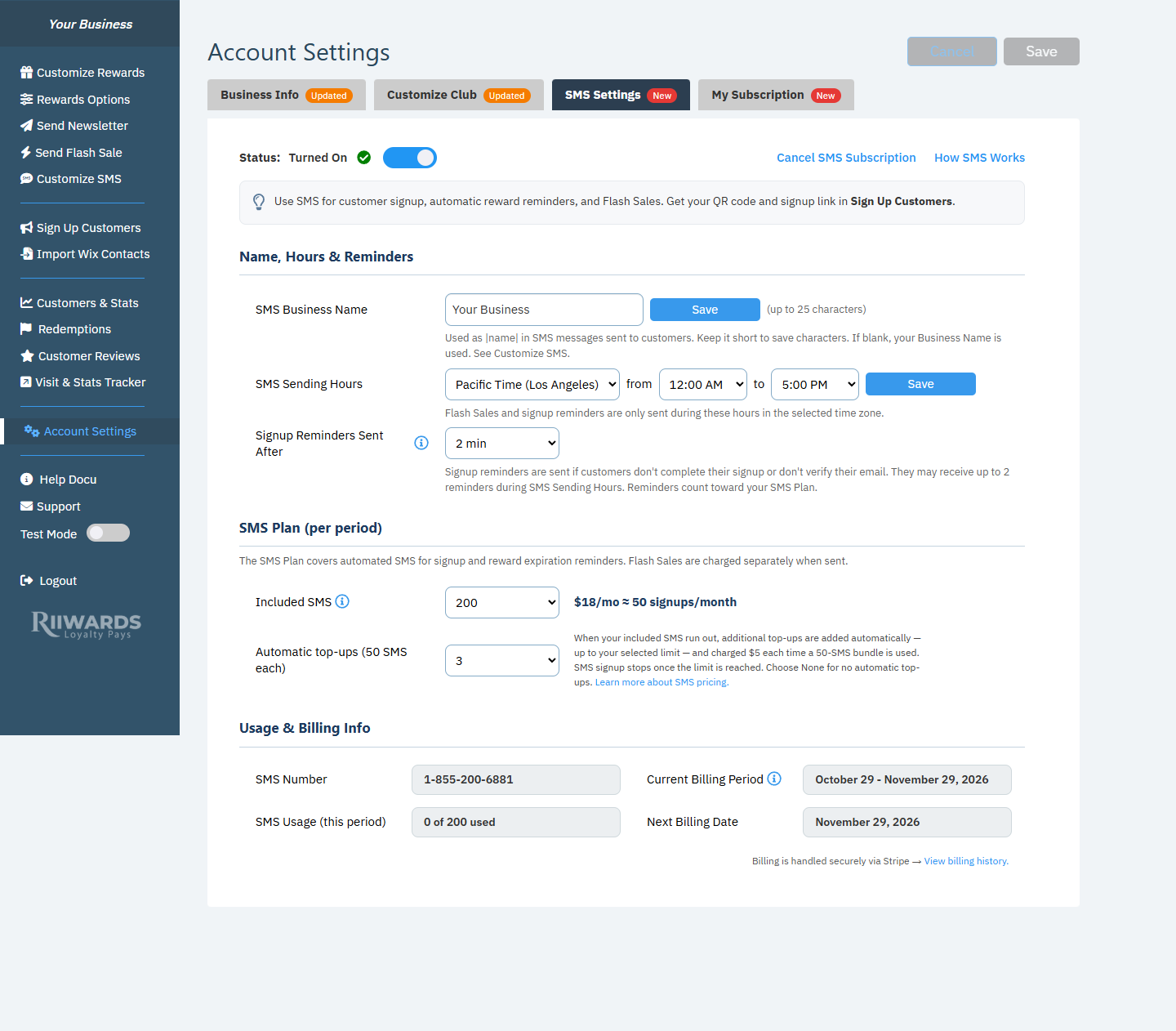
The SMS Settings tab for an active SMS subscription
Status: turn SMS signup on or off
The Status switch at the top turns SMS signup on or off. When you turn it off, the Pause SMS signup? window explains what happens: customers can no longer join your Rewards Club by SMS, and reward expiration reminders stop. Your SMS plan and billing remain active. Click Pause SMS to confirm or Keep SMS to leave it on.Pausing is not cancelling. You keep your number and can turn SMS signup back on at any time.
Name, Hours & Reminders
SMS Business Name
The name customers see in your texts. It replaces|name| in every SMS message. Use up to 25 characters and keep it short to save characters. If you leave it blank, your Business Name is used. Click Save next to the field.
SMS Sending Hours
Choose your time zone, then the earliest (from) and latest (to) time texts may be sent, in 30-minute steps. Click Save. Flash Sales and signup reminders are only sent during these hours in the selected time zone. The latest time must be after the earliest time.Signup Reminders Sent After
How long to wait before reminding a customer who started signing up by text but did not finish the form or did not verify their email. Options: 2, 5, 10, 15, 30 or 60 minutes, 2 or 4 hours, or No reminder. The default is 15 minutes. Customers may receive up to 2 reminders, only during your SMS Sending Hours. Reminders count toward your SMS Plan.SMS Plan (per period)
Your SMS Plan covers automated texts for signup and reward expiration reminders. Flash Sales are charged separately when sent.- Included SMS: how many texts your plan includes each billing period.
- Automatic top-ups (50 SMS each): how many extra 50-SMS bundles can be added automatically when your included SMS run out. Choose None for no automatic top-ups.
Usage & Billing Info
Click View billing history. to see the last 12 months of SMS charges.
Cancel your SMS subscription
Click Cancel SMS Subscription at the top of the tab, then Confirm Cancelation. If you only want to stop for a while, use the Status switch to pause SMS signup instead.Payment problems
If your SMS plan payment fails, a banner says “Your SMS plan payment failed.” SMS keeps working until the date shown. Click Update your card in Manage Billing before then. If the payment still hasn’t gone through when the grace period ends, SMS stops, your SMS plan is cancelled and your SMS number is released.Related
SMS billing
Included SMS, top-ups and Flash Sale charges.
Customize SMS messages
Edit the texts customers receive.
Flash sales
Send a promotion by text.
Sign up customers
Get your SMS QR code and Smart Link.