

This feature is available only for Rewards Clubs connected to a Wix site. For other imports, contact support@riiwards.com.
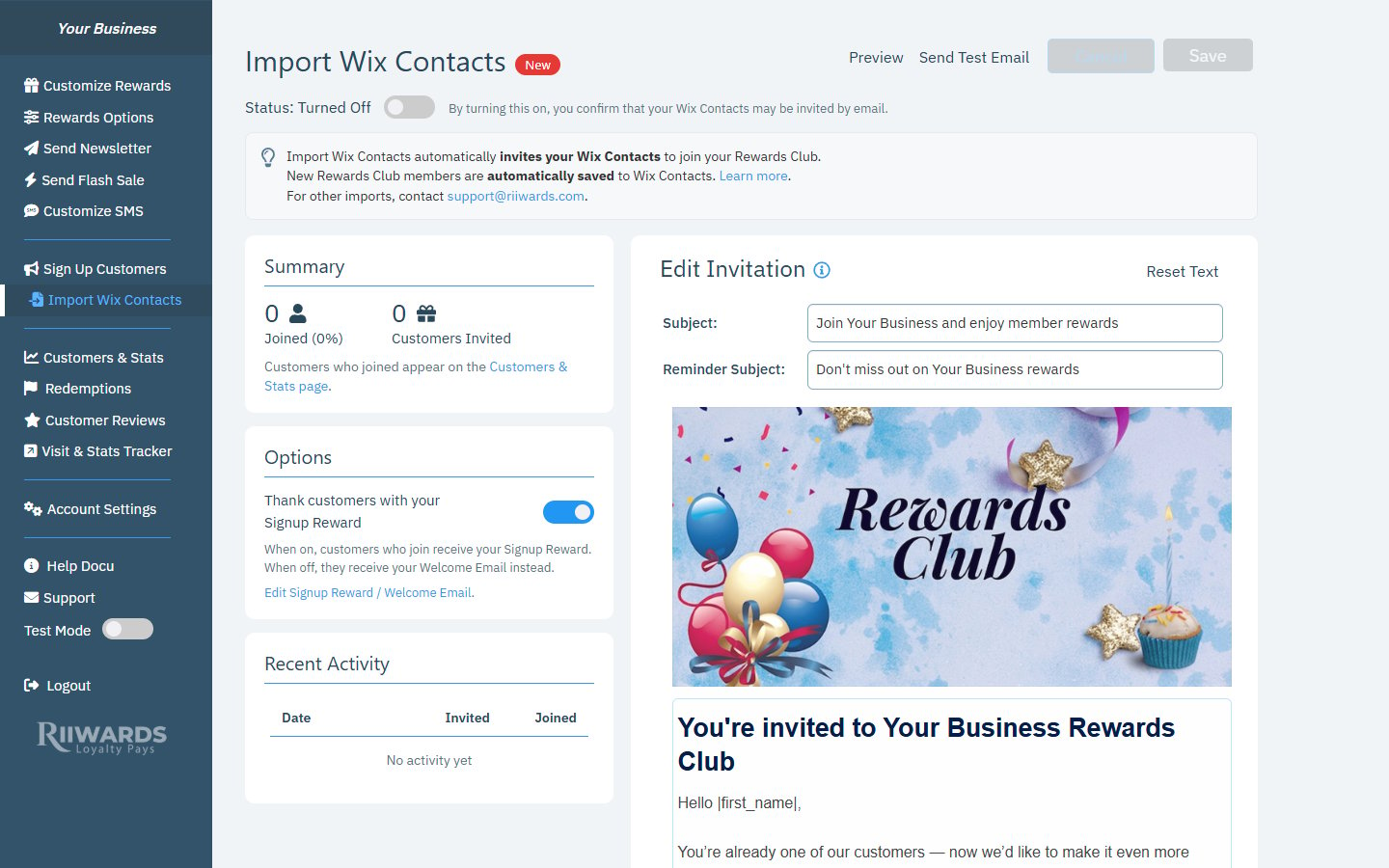
Import Wix Contacts with the status switch, Summary, Options, Recent Activity and the invitation editor
Turn on Import Wix Contacts
1
Review the invitation first
Check the invitation email on the right side of the page (see Edit the invitation). Click Send Test Email to see it in your inbox.
2
Choose what new members receive
Under Options, decide whether to Thank customers with your Signup Reward (see Options).
3
Turn on the status switch
Click the switch next to Status: Turned Off. By turning this on, you confirm that your Wix Contacts may be invited by email.
4
Confirm
The Before you turn on Import Wix Contacts window shows how many contacts will be invited and what happens next. Click Turn on and start inviting.
- How many Wix contacts will be invited, out of all Wix contacts with an email address. Contacts who are already in your Rewards Club, and contacts who unsubscribed in Wix, are skipped. For very large lists the number is an estimate.
- The daily pace. Every day, Rewards Club emails up to 100 of these contacts an invitation to join, and tells you roughly how many days it takes to invite everyone.
- One reminder. Contacts who don’t join get one reminder 7 days later. After that, they are not emailed again.
- What happens when someone joins. Contacts who click Join become Rewards Club subscribers and start getting your rewards (starting with your Signup Reward, if that option is on).
- Free plan room. If you are on the Free plan, it shows how many subscribers you have and whether everyone fits within the 100-subscriber limit. See Free plan.
I see 'Update the Rewards Club app in Wix'
I see 'Update the Rewards Club app in Wix'
Rewards Club does not yet have permission to read your Wix Contacts. In your Wix dashboard, open Apps > Manage Apps > Rewards Club and click Update. You can use the Open Wix Apps button in the message. Then try turning the feature on again.
It says none of my contacts can be invited
It says none of my contacts can be invited
All your current Wix contacts are either already members, unsubscribed, or have no email address. With the feature on, new Wix contacts are still invited as they are added.
Summary
- Joined (%): how many invited contacts joined, and the percentage of invited contacts that joined.
- Customers Invited: how many contacts have been sent an invitation.
Options
Thank customers with your Signup Reward- On: contacts who join receive your Signup Reward.
- Off: they receive your Welcome Email instead.
Recent Activity
A table of recent days with how many contacts were Invited and how many Joined. Click Load more to see older days. Before the first invitations go out, it says “No activity yet”.Edit the invitation
The right side of the page shows the invitation email exactly as contacts will see it.
The rest of the email (your Signup Reward, the Confirm & Join button and the footer) is filled in automatically.
|first_name| is replaced with each contact’s first name.
- Click Preview to see the full email.
- Click Send Test Email to send it to yourself.
- Click Reset Text to go back to the default invitation text.
- Click Save to keep your changes, or Cancel to discard them.
Related
Signup reward
Set the reward new members receive.
Free plan
What happens when you reach 100 subscribers.
Website signup form
Add the signup form to your Wix site.
Customers and stats
See everyone who joined.