

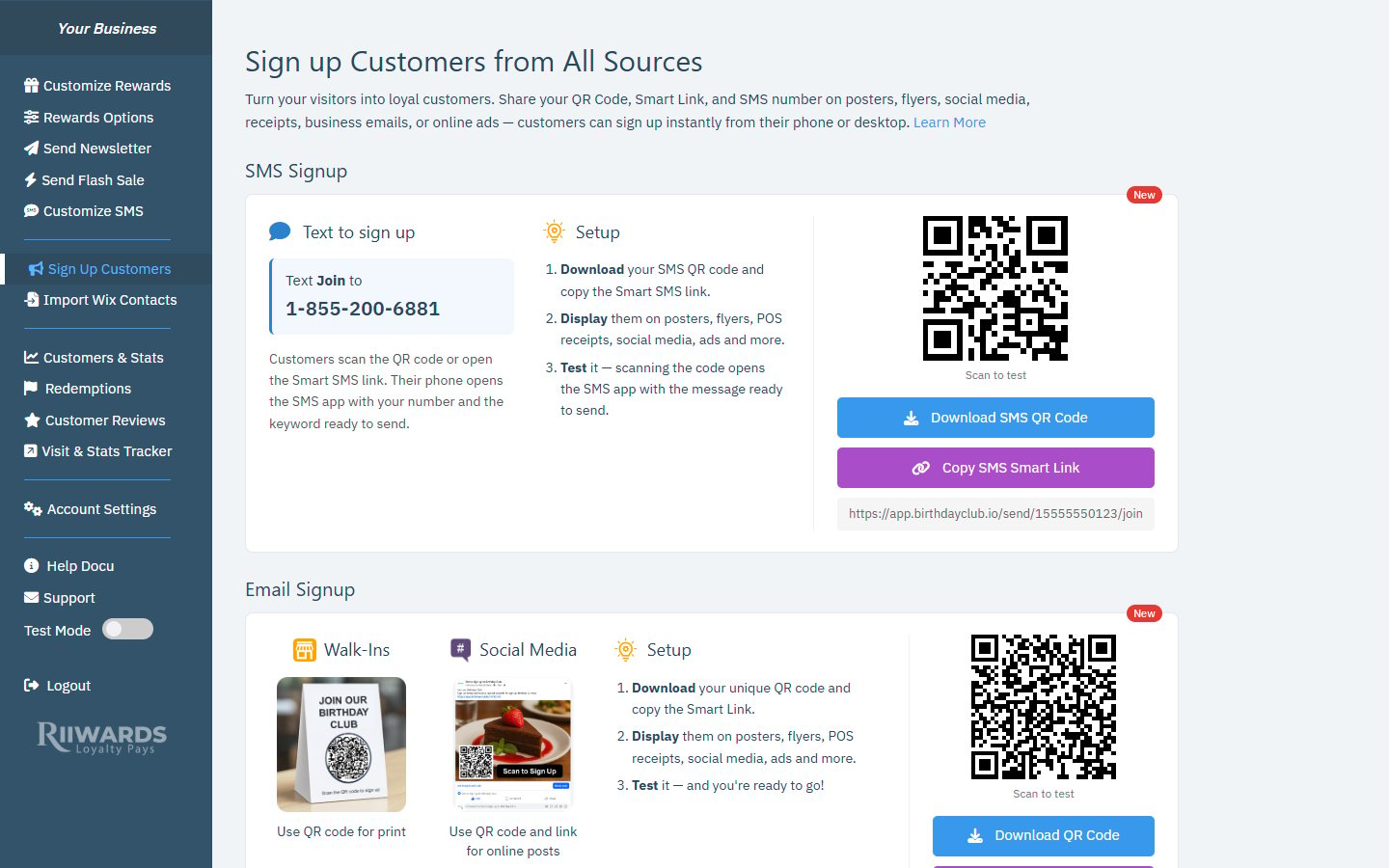
The Sign Up Customers page with the SMS Signup and Email Signup cards
- SMS Signup: customers text a keyword to your SMS number. This card appears only after you set up SMS.
- Email Signup: customers scan a QR code or open a link and join with their email address.
SMS Signup
With SMS signup, customers join by texting Join to your Rewards Club SMS number. The card shows the keyword and your number, for example “Text Join to 1-855-XXX-XXXX”. Customers scan the SMS QR code or open the SMS Smart Link. Their phone opens the messaging app with your number and the keyword already filled in, so they only need to tap send.1
Download the SMS QR code
Click Download SMS QR Code to save the image. Use it on posters, table tents, flyers and receipts.
2
Copy the SMS Smart Link
Click Copy SMS Smart Link to copy the link shown under the button. Paste it into social media posts, emails or online ads.
3
Display them
Put the QR code and link anywhere customers see your brand: posters, flyers, POS receipts, social media and ads.
4
Test it
Scan the QR code with your own phone (the code on the page says Scan to test). Your SMS app should open with the message ready to send.
SMS signup is available in the USA only and needs an active SMS subscription. If you don’t see the SMS Signup card, go to Account Settings > SMS Settings. See Set up SMS.
Email Signup
Email signup works everywhere and is included with every plan. The card suggests two common uses:1
Download your QR code
Click Download QR Code. This QR code is unique to your Rewards Club.
2
Copy your Smart Link
Click Copy Smart Link, or click the link itself under the buttons to copy it.
3
Display them
Add them to posters, flyers, POS receipts, business email signatures, social media and online ads.
4
Test it
Scan the QR code on the page with your phone and make sure your signup form opens.
Create a new Smart Link
If your link was shared somewhere you no longer want it, click Create new link under the Smart Link.Ideas for where to display your signup options
- At the counter or register, on a table tent or sticker.
- On receipts and printed menus.
- In shop windows and on posters near the entrance.
- In social media posts, bios and stories.
- In your email signature and newsletters to existing contacts.
- In online ads.
Troubleshooting
The QR code does not show or a 'QR Code Blocked' message appears
The QR code does not show or a 'QR Code Blocked' message appears
Some ad blockers and browser privacy extensions block the tool that draws the QR code. Turn off your ad blocker for the dashboard, or allow it for this site, then click Refresh Page.
It says 'Signup link is not available yet'
It says 'Signup link is not available yet'
Your Smart Link has not been created yet. Contact support@riiwards.com and we will set it up for you.
A customer tried to sign up many times and was stopped
A customer tried to sign up many times and was stopped
To protect your list from spam and bots, Rewards Club limits how many signups and verification emails can come from the same device or email address in a short time. Normal customers are not affected. Ask the customer to wait an hour and try again.
Related
What customers see
Walk through the signup form and SMS flow from the customer’s side.
Signup form for your website
Add a signup form to your Wix site or any other website.
Set up SMS
Activate text-to-join and reward reminders.
Signup reward
Give new members an instant reward for joining.