

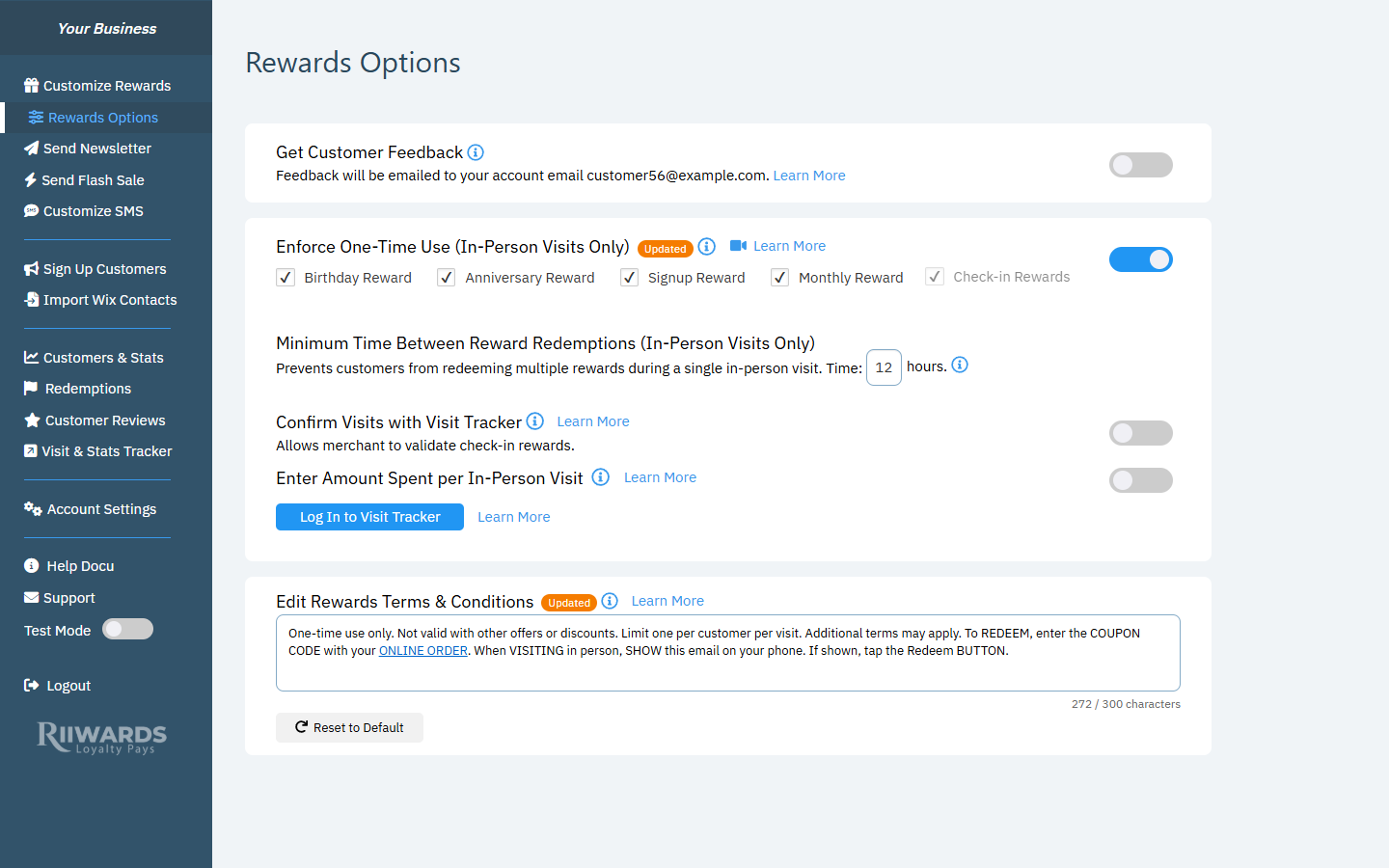
The Rewards Options page
Get Customer Feedback
Turn on Get Customer Feedback to collect ratings and comments from customers through your reward emails. Feedback is emailed to your account email, and you can read all reviews on the Customer Reviews page.Customer Feedback is available on the Marketing+ plan or higher.
Enforce One-Time Use (In-Person Visits Only)
When this toggle is on, reward emails show a Redeem button (for example Redeem When Staff Present). The customer taps it at your counter while your staff is watching. Rewards Club then records the redemption and the visit, and stops the same reward from being used again. Expired rewards cannot be redeemed. Use the checkboxes to choose which rewards get the Redeem button:- Birthday Reward
- Anniversary Reward
- Signup Reward
- Monthly Reward
- Check-in Rewards (always on and cannot be changed, because check-ins need a recorded visit)
One-time use is only available for in-person redemption. If your club is set to redeem rewards online only, a message asks you to change your redemption type in Account Settings > Customize Club first. Turning one-time use off also turns off Confirm Visits with Visit Tracker and Enter Amount Spent per In-Person Visit.
Minimum Time Between Reward Redemptions (In-Person Visits Only)
This setting prevents customers from redeeming several rewards during a single visit. Enter the number of hours that must pass between redemptions (default: 12). The value saves automatically a moment after you type it. The same value also delays check-in reward emails by the same number of hours.Confirm Visits with Visit Tracker
Turn this on to validate check-in rewards. A customer’s next check-in reward email is only sent after a staff member confirms the visit in the Visit Tracker.Enter Amount Spent per In-Person Visit
Turn this on so staff can record how much the customer spent during each in-person visit, using the Visit Tracker. It helps you identify top spenders and measure the impact of your rewards. Turning it on also turns on Confirm Visits with Visit Tracker.Confirm Visits and Amount Spent are available on the Loyalty+ plan or higher.
Log In to Visit Tracker
Click Log In to Visit Tracker to open the Visit Tracker in a new browser tab, already signed in. Share it with staff on a phone or tablet at your counter. See Visit Tracker overview.Edit Rewards Terms & Conditions
The box at the bottom of the page holds the small print added to every reward email. See Rewards terms and conditions.Related
How redemption works
What customers and staff do at checkout.
Check-in rewards
Reward repeat visits.
Confirm visits
Confirm visits and record amounts spent.
Customer reviews
Read the feedback customers send.